This article explains why trades may appear with an abnormally low sell price compared to the current market price.
Visually, this may look like a marker on the chart significantly below the current price.In fact, this is not a bug, but a feature of how the average sell price is calculated.
The main reason why a sale appears at an abnormally low price: the number of purchased coins is greater than the number of sold coins.
Example:
Bought 100 coins for $100, sold 90 coins for $90.
Average buy price = 100 / 100 = $1.
Average sell price = 90 / 100 = $0.9.
Why divide by 100 coins if only 90 were sold?
Because the remaining 10 coins cannot be sold (due to exchange minimum order size limits). You had 100 coins, and after selling you received $90, so the terminal calculates the average price as if 100 coins were sold for $90.
Why do Coin Leftovers Appear?
There are several reasons:
-
You are trading without coins for fees, such as BNB. In this case, the exchange deducts fees in coins, breaking the lot size. For example, you had 2 coins, 0.1 was deducted, leaving 1.9 coins. If the minimum order size is 1 coin, then 0.9 will remain on the balance;
-
You have BNB, but other traders do not. For example, you place a sell order for 2 coins into a wall where only 1.9 is available. After that, you try to move the order, it gets canceled, but cannot be placed again because it is below the minimum lot, and 0.1 remains on the balance.
-
If you cancel a partially filled order, the unsold coins remain on your balance; if the Settings → Main → Cancel small SELL option is enabled, the terminal removes such Sell orders from the chart where the remaining amount is below the minimum lot size; the order is removed only from the list of active orders on the chart, but remains in the report and on the exchange; the purpose of this option is to hide orders that cannot be managed due to the minimum order size limitation;
-
Another variation of the situation: when moving a Sell order, it gets partially filled, and the remaining amount becomes less than the minimum lot size; in this case, repositioning is not possible; the log will display the message: “Looks like order was done while replacing or rest quantity too low.”
-
During the listing period, fees in the first hours may be charged in the traded coin rather than in BNB; this also leads to leftover balances.
How to check if you have leftover coins?
You can check for leftover balances in several ways:
-
In your exchange account, open the spot wallet overview and check for remaining coin balances;
-
In the Moonbot terminal, open Menu → Assets and check balances in the Assets window:
- Coins with an amount above the minimum lot can be placed on the chart or sold at market;
- Amounts below the minimum lot can be converted to BNB using the Convert to BNB button;
-
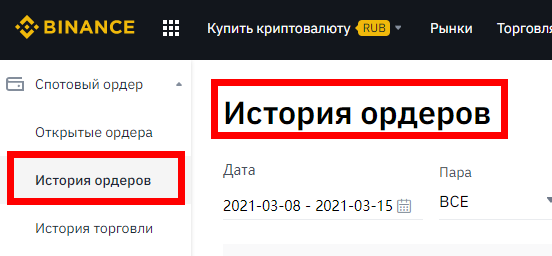
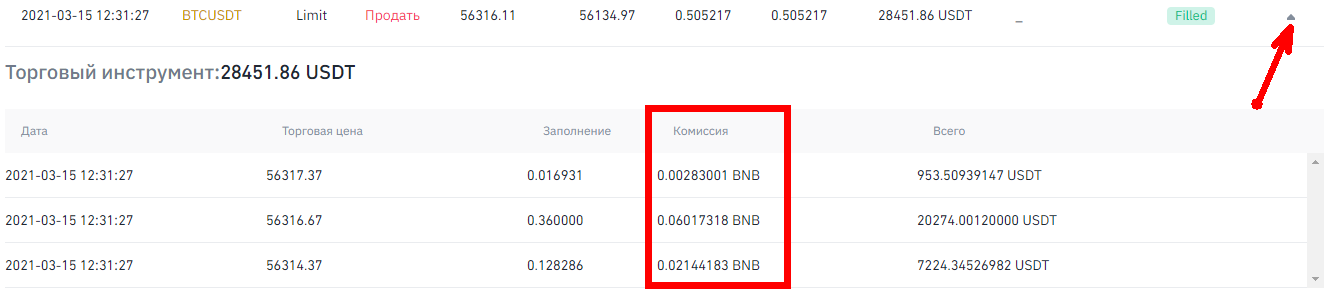
On the Binance exchange, open the order history, find the required order, and expand the trade history.
Check whether the fee was charged in BNB or in the traded coin, and compare the number of coins bought and sold.
All of the above causes and verification methods also apply to cases of incorrect buy price display.